Introducing Weave CLI

We are excited to announce Weave, an all-in-one CLI and toolkit for rollup infrastructure and application development on Initia's Interwoven Stack.
Rollup Deployment Woes
Current rollup infrastructure and tooling are inadequate. To achieve meaningful mass adoption, deploying rollups and app-chains must be as straightforward as deploying a token todaydeploying rollups and app-chains must be as straightforward as deploying a token todayAt the time of writing, most teams still relied on custom shell scripts or manual step-by-step guides to get a rollup running.. Unfortunately, we are still far from this goal.
For more permanent chains like mainnets, rollup-as-a-service (RaaS) options such as Conduit, Caldera, Gelato, and others provide teams with a simple and effective way to configure and deploy their rollups quickly while managing offloading operations and maintenance.
RaaS is not a one-size-fits-all solution, nor should it be. Local or self-hosted rollups are often more suitable for teams experimenting with different stacks or seeking greater control and customizability over their rollups and operations. These options allow for better cost management, reduced vendor lock-in and third-party dependencies, and more tailored security and compliance.
However, transitioning away from these services can lead to a very different experience. Unlike the experience provided by RaaS providers, setting up a local rollup today involves navigating a complex, tedious series of steps:
- Scrolling through endless docs
- Installing the right dependency versions
- Cloning countless GitHub repositories
- Running Docker images
- Manually exporting environment variables & manually configuring files
Unless you're already well-versed in the stack or have automation in place, these steps are time-consuming, error-prone, and are just things that no developer wants to do. All this hassle arises before you even start building your application!
Enter Weave
We're looking to change that with Weave. Our goal is to provide users with a CLI that offers the same simple and hassle-free deployment experience as RaaS while empowering them with the customizability and control of a local deployment. For users, Weave lowers the barrier to entry so they can deploy their rollup and start experimenting. For developers, Weave helps simplify, speed up, and optimize the traditionally lengthy and fragmented deployment process.
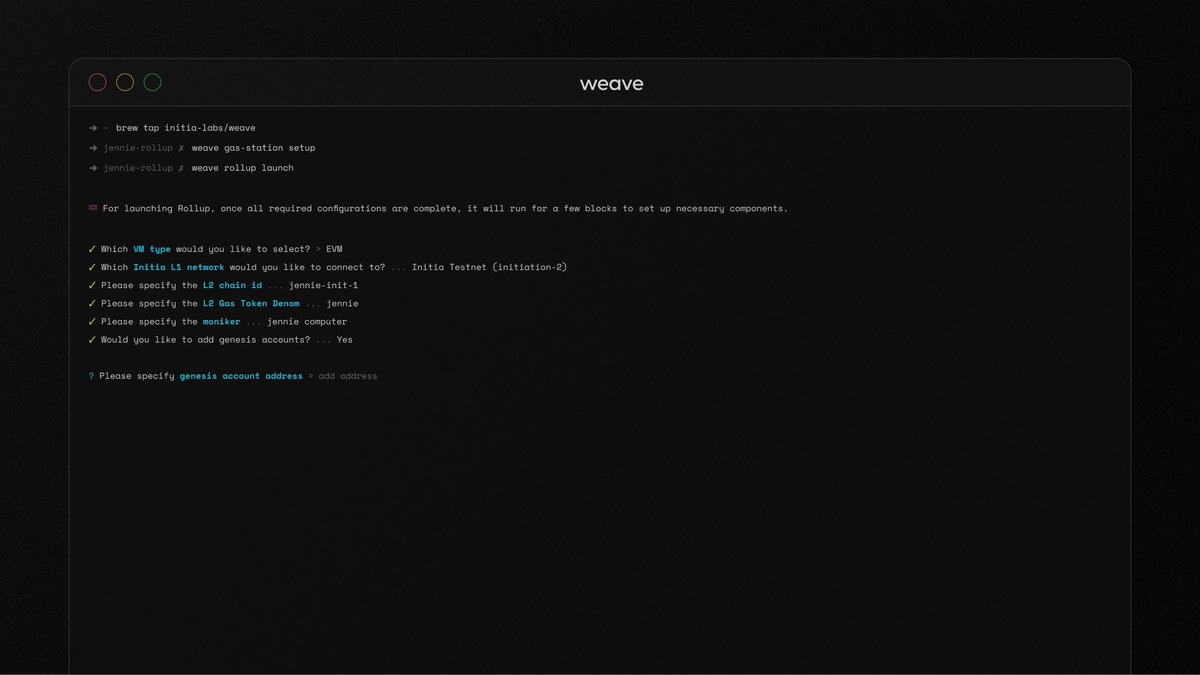
Making Rollup Deployment Accessible
Weave empowers users by simplifying the process of experimenting with and deploying their rollups. Users do not need to know how to execute the abovementioned steps. Instead, Weave offers a RaaS-like interface that allows users to configure their chains easily. Since everything is hosted locally on their machine, users have complete control over the customization of their rollups.
Making Rollup Deployment Effortless
For more technically oriented users, Weave helps streamline and enhance their deployment process. Instead of going through individual disjointed steps, Weave abstracts all of those into a single, unified flowWeave abstracts all of those into a single, unified flowUnder the hood, Weave uses a directed acyclic graph (DAG) to model step dependencies and execute them in the optimal order.. Weave can seamlessly integrate into any CI workflow or script for those looking to automate, allowing developers to bypass the interactive option.
This integration can reduce the complexity of script and pipeline deployments and ensure consistency and reliability. It also allows developers to focus on their application logic rather than the deployment process, making Weave a flexible and user-friendly tool for rollup deployment.
Trying it Out
Enough shillingEnough shillingThis section was actually demoed live at the Initia Builder Summit and got a round of applause when the rollup spun up in under 2 minutes.—let's see how deploying a rollup works with Weave.
In this example, we'll walk through using Weave to deploy an Interwoven Rollup using Celestia DA and connecting it to the Initia testnet.
First, download the Weave command line program. On macOS, you can use Homebrew:
brew install initia-labs/tap/weave
After Weave is downloaded and installed, the first step is to set up your Gas Station Account. This account must be funded with some testnet INIT and TIA. These funds will support the various bots and processes involved in setting up the rollup and relay bridge transactions. To set up your Gas Station Account, run the following command:
weave gas-station setup
You can always view the balances of your gas station account by running:
weave gas-station show
This will give you an output similar to the following:
⛽️ Initia Address: init1r89mzz2kk9drrhufhndse4g79aruc3g52qjhtuTestnet┌─────────────┐│ 200 INIT │└─────────────┘⛽️ Celestia Address: celestia1r89mzz2kk9drrhufhndse4g79aruc3g54ur56nTestnet┌─────────────┐│ 100 TIA │└─────────────┘Mainnet┌─────────────┐│ No Balances │└─────────────┘💧 You can obtain testnet INIT from -> https://faucet.testnet.initia.xyz💧 For testnet TIA, please refer to -> https://docs.celestia.org/how-to-guides/mocha-testnet#mocha-testnet-faucet
Once your Gas Station account has some testnet INIT and TIA, you can deploy your rollup by running:
weave rollup launch
The CLI will guide you through setting up your rollup. By simply using the arrow keys, you can:
- Select your VM
- Choose your Chain ID and (default) gas token denomination
- Choose your DA Layer
- Enable Price Oracle
- Set Genesis Accounts
Compared to the traditional rollup setup process or scripts, Weave offers several convenient features:
- For lower-level configurations, such as OP Bridge and DA configurations, Weave can help by filling in recommended values
- If you want more information about a specific option, access the tooltip by pressing
Ctrl+T - If you make a mistake or change your mind about an option, you can go back and change it using
Ctrl+Z
After choosing all the necessary options, Weave will automatically:
- Change the rollup configuration files to match with your selected options
- Download the necessary rollup and Celestia node binaries
- Execute the launch process and start the rollup
Once the setup process is complete, your rollup is successfully registered and connected with the Initia L1. Weave will also generate a magic link to paste into your browser to add and view your rollup on InitiaScan.
Beyond Rollup Deployment
Our goal with Weave is to extend its functionality beyond rollup deployment and make it the primary toolkit for anyone looking to build on Initia and the Interwoven Ecosystem.
To that end, with this first release, Weave also supports deploying Initia L1 nodes. Compared to the standard methods of spinning up nodes for Cosmos SDK chains, we've improved upon that process in multiple ways:
- Automatic Seed and Peer Node Sourcing: Weave can recommend applicable peer and seed nodes for your node to connect to without scouring through Discord channels or documentation pages
- Integrated Cosmovisor Setup: Node operators can choose to enable Cosmovisor for seamlessly upgrading their nodes without having to go through a separate deployment process right within the node deployment flow
- Simple Pruning Strategy Selection: Easily choose the pruning strategy, which determines how much historical chain data your node keeps, without having to edit the configuration files manually
What's Next
We still have many more features we want to add. Some of these include:
- Running nodes for other rollups, both yours and those live on testnet or mainnet
- Scaffolding contract and frontend repositories for any supported VM with tooling like Initia Wallet Widget already built-in
- And more
Learn more about Weave and explore the codebase on GitHub.
Thanks to the team—Wasin, Traviolus, Benz, Jennie, and everyone else involved in building Weave. A special thanks to Polka for powering much of the node configuration automation.